

In this article
We break down what to look for in an ETO ERP system — and why many standard systems struggle to support custom manufacturing.



Engineer-to-Order (ETO) manufacturers don’t work like most businesses. Every job is different, designs change, and costs shift mid-project. What starts in engineering needs to flow cleanly into production, purchasing, and scheduling.
Most ERP systems aren’t built for that. Most rely on fixed bills of materials and stable workflows, which makes it difficult to manage changing designs, track revisions, or keep engineering and production aligned without manual workarounds.
If you’re evaluating ERP options for an ETO environment, the goal isn’t just to ‘manage operations.’ It’s to connect engineering, production, and financial data in a way that reflects how your business actually runs.

Most ERP systems are built around repeatable processes, with standard products, fixed bills of materials, and predictable workflows at their core. That structure works well for make-to-stock environments, and even for some make-to-order operations. But it starts to break down in ETO, where variability is the norm and processes aren’t nearly as consistent.
In an ETO business:
Generic ERP systems often try to force this into a more rigid structure, which leads to manual workarounds and disconnected spreadsheets. It also creates gaps between engineering and production, along with limited visibility into real costs. Over time, those gaps lead to delays, rework, and less control over project profitability.
Before choosing an ERP, it helps to be clear about what makes ETO unique.

Work starts with design. That design defines materials, routing, and timelines. If engineering data doesn’t flow cleanly into the ERP, everything downstream suffers.
Revisions are part of the process. Customers request changes. Designs evolve. Your system needs to handle that without breaking traceability or creating confusion on the shop floor.
Each job has its own scope, timeline, and cost structure. You’re not just managing orders — you’re managing projects.
An ERP system for ETO needs to reflect all three realities.
Some capabilities aren’t ‘nice to have.’ They’re essential. Without them, everyday tasks like managing revisions, building BOMs, or tracking costs become manual and time-consuming. Over time, that leads to inconsistent data, delays on the shop floor, and limited visibility into how projects are really performing.
Engineering and production can’t live in separate systems.
A strong ETO ERP connects directly to CAD tools (like SolidWorks), allowing you to:
Without this, teams often rely on spreadsheets or duplicate data entry, which introduces risk at every step.
In ETO, BOMs are not static. They’re dynamic and often nested, meaning they’re built up in layers of subassemblies that can be created, modified, or restructured as the project evolves.
To manage this effectively, you need to be able to:
This is especially important when similar projects share components but differ in key areas.
Changes happen. The question is whether your system can handle them cleanly.
Look for:
Without this, teams risk building from outdated information or losing track of approved changes.
ETO manufacturers don’t just need cost tracking — they need cost control throughout the life of a job. Costs change as designs evolve, materials are ordered, and work progresses on the shop floor. Without real-time visibility into both actual and committed costs, it’s easy for margins to slip unnoticed until the project is complete.
Each job should be treated as its own financial entity.
That includes:
You should be able to see how costs accumulate as the project progresses — not just after it’s complete.
One of the biggest blind spots in ETO is committed cost.
It’s not enough to know what you’ve spent. You also need to know what you’ve committed to spend:
This gives a more accurate picture of where the job is heading financially.
Margins shouldn’t only become clear at the end of a project.
An effective ERP helps you:
This is especially important in long-cycle projects where small issues can compound over time.
Scheduling in ETO is more complex than simply sequencing jobs. Each project has its own timeline, dependencies, and resource requirements, and those can change as designs evolve or priorities shift. It’s not just about what runs next — it’s about coordinating multiple moving parts while keeping everything aligned.
You need a clear view of:
Without this, it’s difficult to commit to realistic timelines.
ETO projects often involve:
Your scheduling system should reflect those relationships, not treat jobs as isolated tasks.
What’s happening on the shop floor should be visible in the system.
That includes:
This allows teams to respond quickly when plans change—which they often do in ETO.
AI is getting a lot of attention in manufacturing, and there are areas where it can help.
But it’s not a replacement for a solid ERP foundation. In practice, AI is most useful when it’s built into the system you already use, working with the same data your team relies on every day.
AI can support ETO operations by working with historical and real-time ERP data to:
For example, analyzing past jobs can help teams build more accurate quotes or flag risks before they impact timelines or margins.
AI struggles with:
In ETO manufacturing environments, many decisions still rely on engineering expertise and context that AI doesn’t fully capture.
AI can support better decision-making, but it depends on having clean, connected data.
That starts with:
Without that foundation, AI has very little to work with — and limited impact on day-to-day operations.
Choosing an ERP for an ETO environment isn’t just about comparing feature lists. The real question is how well the system supports day-to-day operations. That means looking beyond surface-level capabilities and understanding how engineering, production, purchasing, and finance work together inside the system.
In practice, this comes down to how the ERP handles change, complexity, and visibility. Can it take engineering data and turn it into something production can use without manual steps? Can it manage revisions without losing track of what’s been approved or released? Can it give you a clear view of costs and timelines as a project moves forward?
These are the kinds of questions that matter in an ETO environment — and they’re not always obvious in a standard demo.
A good evaluation should focus on real workflows, not ideal scenarios. The more closely a system reflects how your team actually works, the easier it will be to adopt, and the more value you’ll get from it over time.
Ask vendors to show:
If the demo relies heavily on manual steps or workarounds, that’s a red flag.
These questions help uncover how well a system supports real-world processes, and they’re worth exploring in detail when evaluating ERP options. The answers should be specific and grounded in real workflows.
These are signs the system may struggle in a true ETO environment.
ETO manufacturing is complex by nature. Your ERP system shouldn’t add to that complexity.
The right system helps you:
As your business grows, those capabilities become even more important.
If you’re evaluating ERP options, focus on how well the system supports the realities of ETO — not just how well it fits a generic model. That’s what ultimately determines whether the system works in practice.
Explore how systems built for engineering-driven production help you manage complexity, improve visibility, and stay in control as your operations scale. See how Genius ERP connects engineering, production, and costing in one system. —Talk to Sales —

"*" indicates required fields

AI technology built directly into ERP systems can help automate routine processes or create better user experiences by learning and adapting to user's language, allowing systems to better understand and respond to users.
See how our integration with HubSpot connects customer information, quotes and sales orders across both systems.
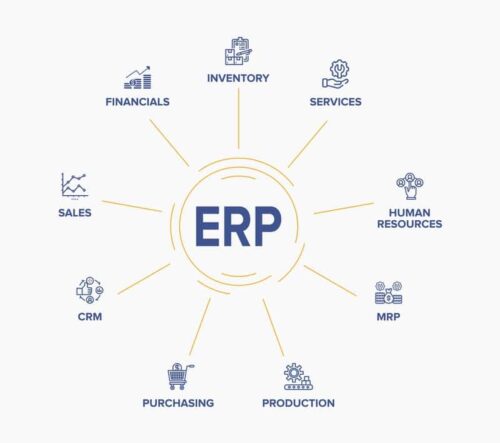
An ERP is business process management software that connects and integrates every aspect of a business — giving manufacturers visibility over their entire operation and allowing them to create better manufacturing processes, lower costs, and improve performance.
Give us a call to see how we’re different.

