Learn what ERP software is, how it works and how ERP systems have evolved to connect people, processes and information across a manufacturing business. We’ll also explore how full-suite ERP software can improve manufacturing operations and what to consider when choosing the right ERP for your company.
ERP stands for Enterprise Resource Planning — but what does that actually mean?
ERP is business management software that connects the different parts of a company in one system. For manufacturers, that means bringing sales, engineering, purchasing, inventory, production, accounting and other core functions together so they can share information and work from the same data.
Without an ERP system, manufacturers need to use multiple software programs and systems, like Excel, that don’t talk or work with each other to run their organization. This slows collaboration, creates extra work and limits efficiency. An ERP system replaces these disconnected systems with a central platform that gives manufacturers better visibility over their entire operation and helps them coordinate work, improve processes, control costs and make more informed decisions.
But that is only the short answer. To really understand what an ERP does, it helps to look at how these systems work, what they include and how they support the day-to-day operation of a manufacturing business.
What Is ERP Software?
ERP software manages and integrates a company’s core business processes. Instead of each department working in its own system or maintaining separate records, an ERP gives people across the organization access to shared information.
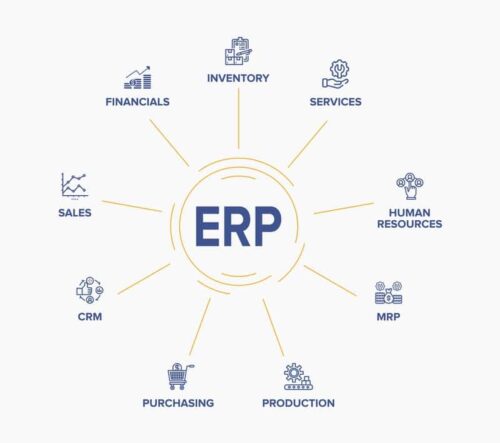
An ERP can connect functions such as:
- Sales and customer relationship management
- Estimating and quoting
- Engineering and bills of materials
- Inventory and purchasing
- Production planning and scheduling
- Shop-floor management
- Project management
- Quality control
- Accounting and financial reporting
- Job costing
The exact tools included will vary from one ERP to another and depend on what your business needs. What makes the system an ERP is not simply the number of features it offers. The real value comes from integrating processes and information across the business.
For example, inventory does not operate independently of purchasing or production. Engineering decisions affect material requirements, costs and schedules, while work completed on the shop floor affects job progress, delivery dates and financial results. An ERP connects these relationships so information can move between the people and processes that depend on it.
History of ERP Systems
The term ERP was coined in the 1990s, but enterprise resource planning systems actually have their roots deep in the manufacturing industry and can trace their history back to the 1960s.
During the 1960s, manufacturers began using early Material Requirements Planning systems, commonly known as MRP, to calculate material requirements and help manage inventory. These systems gave manufacturers a better way to determine what materials they needed, how much they needed and when they needed them to support production.
MRP systems became more widely adopted and increasingly sophisticated through the 1970s. By the 1980s, they had developed into Manufacturing Resource Planning systems, or MRP II. These expanded systems went beyond material requirements to support more manufacturing activities, including production planning, capacity and scheduling.
In the 1990s, software providers began adding functions such as accounting, finance, sales and human resources to systems that had previously focused mainly on manufacturing. The term Enterprise Resource Planning emerged to describe this broader approach to connecting processes and information across an entire organization.
ERP systems have continued to evolve. Modern platforms may include mobile applications, dashboards, business intelligence, automated workflows, integrations and artificial intelligence. These tools give manufacturers new ways to access information, automate work and manage their operations.
ERPs in the Modern Manufacturing World
Modern ERP systems are designed for many different industries, company sizes and operating models. Some provide broad functionality that can be configured for many types of businesses. Others specialize in the requirements of a particular industry, such as manufacturing.
For manufacturers, fit matters. A system built primarily for finance or distribution may offer accounting, purchasing and inventory tools but lack the depth needed to manage complex bills of materials, engineering changes, production schedules, shop-floor activity or job costs.
A manufacturing ERP goes further by connecting these core business functions with the shop floor and the front office. It allows information to move between estimating, engineering, production, inventory, purchasing, project management and accounting. This is especially important for custom manufacturers, where every order can have different specifications, material requirements, routings, costs and delivery commitments.
Modern ERP systems also give manufacturers more ways to access and use their information. Dashboards and reporting tools help teams monitor performance. Workflow automation helps routine steps happen consistently. Integrations connect the ERP with specialized systems, while AI tools can help employees enter information, find answers and work more efficiently.
How ERP software is delivered has changed too. Traditionally, ERP software was installed on a company’s own servers and managed on-premises. Today, manufacturers can also choose a cloud ERP, which is hosted by the provider and accessed online, or a hybrid model that combines on-premises and cloud applications. Regardless of its capabilities or deployment model, the central purpose of an ERP remains the same: connecting processes and information across the business.
How Does an ERP Work?
An ERP brings information from across a company into a centralized system. Its modules support different business functions, but they share data and work together.
This gives the organization a common structure for creating, storing and using information. Instead of maintaining separate customer, item, inventory or job records in several systems, employees can work from a consistent set of data. This reduces duplicate entry, limits errors and makes it easier to trace information back to its source.
It also improves the flow of information between departments. Consider what can happen when a manufacturer receives a new customer order:
- Sales enters the order using the customer, product and pricing information already in the ERP
- Engineering creates or confirms the bill of materials and production requirements
- Inventory and purchasing determine which materials are available and which need to be ordered
- Production planning schedules the work based on priorities, capacity and material availability
- Employees record time, material use and job progress as work moves through the shop
- Accounting uses the same operational data to invoice the customer, monitor costs and report on profitability
Each department has its own responsibilities, but everyone is working with connected information. Purchasing does not have to wait for someone to send an updated spreadsheet. Production planners can see the requirements associated with the job. Accounting does not need to recreate operational records in a separate system before it can determine what a job cost.
This connected structure gives everyone — from company leadership to shop-floor employees — access to the information they need for their role. It creates a reliable source of business data and gives managers a clearer view of what is happening across the operation.
What Is a Full-Suite ERP?
When researching ERP software, manufacturers may come across the term full-suite ERP. A full-suite ERP brings a broad range of business functions together in one integrated system. Rather than addressing only accounting, inventory or production, it is designed to support most or all of the company’s core operations.
A full-suite manufacturing ERP may include tools for sales, CRM, estimating, engineering, production, scheduling, inventory, purchasing, project management, quality, accounting and job costing. Because these functions are connected, information can flow from one stage of a job to the next.
This is different from relying on separate applications for each department. Specialized applications can still have an important role, and a full-suite ERP may integrate with CAD software, shipping systems and other tools. The difference is that the ERP acts as the operational hub, keeping core data and processes connected.
Working within an integrated suite can also make training, reporting and support more consistent. Employees learn a common system, managers can view information from across the business and teams spend less time reconciling conflicting records. The result is a more complete view of the operation and a better foundation for coordinating work.
How Does an ERP Help Improve Manufacturing Operations?
An ERP helps manufacturers manage the relationships between departments, materials, people, machines, costs and customer commitments. The specific results depend on the system, the company and how well the ERP is implemented, but a well-matched ERP improves operations across your business.
Connect Departments and Improve Collaboration
Manufacturing processes cross departmental boundaries. A change made by engineering may affect purchasing, production, scheduling and job costs. A material delay may change when a job can start and when the finished product can be delivered.
An ERP makes this information available across the company. Teams do not need to rely as heavily on emails, meetings or manually updated spreadsheets to tell one another what has changed. With access to the same up-to-date information, departments can coordinate decisions and respond more quickly when problems arise.
Increase Efficiency and Reduce Manual Work
Disconnected systems create repetitive work. Employees copy data from one application to another, maintain duplicate records and spend time checking which version of a spreadsheet is correct.
An ERP reduces these manual steps by allowing information to be entered once and used by the processes that need it. Workflows can also automate routine actions, notifications and approvals. This saves time, reduces the opportunity for entry errors and lets employees focus on work that requires their knowledge and judgment.
Improve Production Planning and Control
Production plans depend on accurate information about orders, materials, labor, machines, priorities and capacity. When this information is scattered, planners may build schedules based on incomplete or outdated data.
An ERP brings production requirements together and gives planners greater visibility into the factors affecting the schedule. They can see what work needs to be completed, whether required materials are available and how jobs are progressing on the shop floor. When priorities or conditions change, they have better information for adjusting the plan and keeping work moving.
Connect Inventory and Purchasing
Manufacturers need enough material to support production without tying up too much cash in inventory they do not need. That balance is difficult to maintain when inventory records, purchasing data and production requirements are managed separately.
An ERP connects inventory to demand, open orders and purchasing. Buyers can see what is required for upcoming work, monitor outstanding purchase orders and act on anticipated shortages. More accurate records also help manufacturers avoid unnecessary purchases, reduce stockouts and give production teams greater confidence that required materials will be available.
Support Engineering and Project Management
For custom manufacturers, engineering information is a critical part of every job. A manufacturing ERP can connect bills of materials, routings, revisions and related documentation to production requirements. When integrated with CAD software, it can also reduce the manual work involved in transferring engineering data into the ERP.
Project management tools provide visibility into milestones, responsibilities, priorities and progress. By connecting project information with purchasing, production and costs, an ERP helps teams see not only whether tasks are complete, but how the entire job is progressing.

How Loos Machine & Automation Improved Estimating, Projects, and Financial Visibility with Genius ERP
Improve Accounting and Job Costing
Accounting becomes easier when financial information is connected to the activities that generate it. Instead of cross-referencing separate production, inventory and accounting systems, the accounting team can use operational data captured in the ERP.
This supports financial reporting, invoicing and cash flow management while also giving manufacturers a clearer understanding of job costs. Material, labor, outside processing and overhead costs can be tracked against individual jobs and compared with estimates. Managers can identify overruns, evaluate profitability and use what they learn to improve future quotes and decisions.
Give Sales and Customer Service Teams Better Information
Although customers may never interact directly with an ERP, they experience its effects. Connected information helps sales teams prepare more accurate quotes, check order status and give customers better answers. More reliable planning and production control can also support more realistic delivery dates and better on-time performance.
When an ERP includes CRM tools, teams can manage customer information, opportunities, quotes, orders and communication history in one place. This gives employees more context when responding to customers and makes it easier to coordinate handoffs between sales and operations.
What Is the Best ERP?
There is no single ERP that is best for every company. The better question is: What is the best ERP for our business?
The answer depends on your industry, size, manufacturing model, budget, existing systems and operational needs. A system designed for a multinational organization may be too complex for a small or mid-sized manufacturer. An ERP built for repetitive production may not adequately support a company that engineers and builds custom equipment.
All capable ERP systems should help connect information, improve efficiency and give you better control over your operation. But a long list of impressive features does not automatically make a system the right fit. The ERP needs to solve the problems that matter to your business and support the way your team works.
Before researching vendors and comparing demonstrations, identify what you actually need to improve. Bring together a small group of people who understand different parts of the business and ask where your current processes, systems and information are holding you back.
One useful way to define a goal is to complete this sentence:
We need to improve ______ by ______.
For example:
- We need to improve on-time delivery by creating a more reliable production schedule
- We need to improve margins by tracking and controlling job costs
- We need to improve inventory accuracy by recording material movements consistently
- We need to improve coordination by giving departments access to the same information
Once you understand the results you need, you can evaluate whether an ERP has the right capabilities to deliver them. Look beyond individual features and consider how well the system fits your industry, connects your core processes and supports your employees. Implementation approach, training, vendor expertise and ongoing support also matter because even well-designed software will only create value if your organization can use it effectively.
ERP Selection Guide 2026: How to Evaluate Vendors by Business Size and Manufacturing Type
The best ERP is not necessarily the biggest system, the most recognizable name or the product with the longest feature list. It is the one that meets your requirements, fits your operation and gives your business a solid foundation for improving and growing.
Bringing Your Business Together
At its core, ERP brings people, processes and information together. It replaces disconnected systems with a shared platform and gives manufacturers a clearer view of what is happening across their operation.
The right ERP can help your team coordinate work, improve production, manage inventory, understand costs and make better-informed decisions. But the value does not come from software alone. It comes from choosing a system that fits your business and using it to build better, more connected ways of working.
If you’re starting to explore your options, download our How to Select the Right ERP ebook for practical advice on identifying your software needs, organizing your selection team and evaluating ERP providers.
Get your eBook Scared to implement a new ERP?
"*" indicates required fields