



What You’ll Learn in This Webinar
Chapter 1 — Introduction and Housekeeping
The webinar opens with a job posting: a full-time order-entry clerk role that retypes customer POs into the ERP and checks part numbers by hand — open for eight months with a couple of applicants but zero hires. That real vacancy sets up the hour’s central question: could this job actually be done by an agent instead?
Chapter 2 — The Hiring Wall Dilemma
While a posting sits open, the work still gets done by someone else — an inside rep at night, a controller on a Saturday — people hired for judgment doing work that needs none. A live poll found 8% of attendees fully staffed, about 75% with one or two open roles, and the rest with three or more. The deeper issue isn’t just the vacancy itself: salary stays fixed even when demand dips, so headcount can’t flex with the market — something the presenter says keeps owners up at night more than hiring itself.
Chapter 3 — Shifting Mindsets: Agents vs. Employees
Some jobs don’t need a person, they need an agent — specifically the repetitive, rule-based work, not creative work or judgment calls. A new employee brings months of recruiting, training, a salary that stays even when work slows, and knowledge that walks out the door when they leave; an agent brings the same output on repetitive work, cost that flexes with volume, no turnover or fatigue, and knowledge that stays documented. The framing: treat an agent hire like hiring a person — job description, onboarding (connect to data, teach the rules), a predictable wage, and a performance review. Two years ago this kind of custom software project meant six to twelve months and a six-figure IT initiative; AI has since collapsed that cost.
“Some jobs don’t actually need a person, they need an agent.”
Chapter 4 — Introducing Cortex Intake: The First Agent
Cortex Intake is already in production: it reads POs the moment they land in the inbox, checks parts, pricing, and customer info against the ERP, creates the sales order, and flags anything unusual for a human. In one demo run, it processed 56 lines from an incoming order (matched against a prior day of 1,600 lines and 318 the day before that) with a 62% overall confidence score — 30 lines needed no change, 9 were auto-validated, and 17 were flagged for human review, with the reasoning shown in plain language rather than hidden in a black box. After a 90-day review: processing time dropped from 12 minutes to 90 seconds per PO, 8 out of 10 POs were processed with no human touch, and zero transcription errors were recorded (figures described as illustrative from early deployments, with real metrics agreed on with each customer before measurement).
Chapter 5 — Cortex Collect: Automating Invoice Chasing
Cortex Collect handles AR collections: it detects past-due invoices, sends personalized reminders with the right tone and timing, and escalates to a human only when there’s silence or a dispute. In the demo, an 8am sweep flagged 12 customers needing action and $184,000 at risk, sorted by criticality; one customer’s reply with a payment promise was captured automatically into the file. After 90 days: days sales outstanding dropped by nine days, 7 out of 10 overdue invoices were resolved with no human touch, and the controller got back about 5 hours a week — with the presenter noting nine days of DSO on manufacturer receivables is real cash, not just a metric.
Chapter 6 — Identifying Bottlenecks in Manual Work
A live poll on where teams lose the most time to manual work found order entry leading, warehouse/inventory work at 55%, and the rest (shop floor data, invoicing, approval signatures) fairly evenly split. Beyond the two examples already shown, other commonly automatable areas mentioned: time card validation (flagging only exceptions to supervisors), AP invoice three-way matching (posting clean matches automatically), PO follow-up with vendors for acknowledgments and delivery confirmations, and turnover documentation — auto-assembling certs, drawings, and weld maps into a package the moment a milestone (like a barcode-scanned hydro test) is completed, then generating the associated invoice.
Chapter 7 — Spotting Your First Agent Hire
A scorecard rates a specific task from 1–5 on five criteria: how repetitive it is, whether it’s rule-based (could you write an SOP for it?), whether the data is structured and accessible, how costly it is, and how risky a mistake would be. In a live poll, 36% of attendees scored their task 18+, 55% scored 12–17, and 9% scored under 12. An 18+ score signals a strong first candidate; 12–17 is worth a look (often just one fix away, usually a data-structure issue); under 12 means keeping it with a human for now, until AI improves further.
Chapter 8 — Cautions in Automation Projects
Three places these projects tend to die: tasks that require a genuine judgment call (the fix is human-in-the-loop — break the task into subtasks, let the agent handle everything before the judgment point, then have a human validate before it continues); rare events, like something that happens twice a year, where a human stays cheaper; and “boil the ocean” projects that try to automate everything at once and end up shipping nothing. The recommended discipline is one job, one task, one hire at a time — and once several independent agents exist, an “orchestrator” agent coordinates them and escalates anything flagged to a human.
Chapter 9 — The Role of Agents in Business
The core reframe: an agent brings all the upside of a new hire with none of the baggage, and the ROI math is rarely the hard part — the hard part is accepting how simple it actually is. The presenter frames it as hiring help rather than buying software, and invites attendees to send in their own job/task description for an honest read on whether an agent could do it (or, if the scorecard came in under 12, help find a better first candidate instead).
“The agent brings you all the upside of a new hire, but none of the baggage that comes with it.”
Chapter 10 — Q&A Session
Key answers from the live Q&A: onboarding an agent typically takes 6–12 weeks, with a minimum-viable version live fast and a formal measurement checkpoint at 90 days against pre-agreed metrics. Live customer data couldn’t be shown on screen for privacy reasons, but the presenter offered to arrange a call with a reference customer to see an agent working live. There are no hard prerequisites beyond having accessible data — on-prem or not doesn’t matter, and Genius ERP itself isn’t required, since agents can work off a file server too (Genius just happens to already hold a lot of structured data). Agents run on the back end; if a customer has Genius Web, the interface is built directly into it, otherwise a separate interface is built on the customer’s own servers. A separate, unrelated question about current Genius time-card functionality was also answered: Genius supports punch-clock shop floor time tracking with validation/approval workflows tied to job costing, as well as a more generic manual timekeeping entry system typically used for payroll.
FAQ
Why replace a role with an agent instead of hiring a person?
An agent delivers the same output on repetitive work with cost that flexes with volume, no turnover or fatigue, and knowledge that stays documented — while a new hire brings months of training and a fixed salary that doesn’t flex when demand dips.
How do I know if a task in my business is a good candidate for an agent?
Score it 1–5 on five criteria — how repetitive it is, whether it’s rule-based, whether the data is structured, how costly it is, and how risky a mistake would be. An 18+ total signals a strong first candidate.
What kinds of tasks are NOT good candidates for an agent?
Tasks that happen rarely (a couple of times a year) usually don’t justify the cost, and tasks requiring real judgment calls should keep a human in the loop rather than being fully automated.
How long does it take to get an agent up and running?
Roughly 6 to 12 weeks to a minimum-viable version, with a formal 90-day review against pre-agreed metrics.
Do I need Genius ERP to use an agent like this?
No — the only real requirement is that the data is accessible. Genius is a convenient system of record with a lot of structured data already, but agents can also work directly off a file server.

Get your eBook Scared to implement a new ERP?
"*" indicates required fields
Explore related articles

How will Artificial Intelligence Impact ERP Software?
AI technology built directly into ERP systems can help automate routine processes or create better user experiences by learning and adapting to user's language, allowing systems to better understand and respond to users.
What’s New in the HubSpot–Genius ERP Integration
See how our integration with HubSpot connects customer information, quotes and sales orders across both systems.
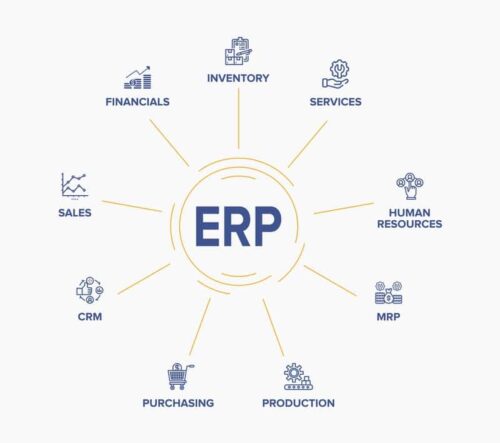
Back To Basics: What Is an ERP?
An ERP is business process management software that connects and integrates every aspect of a business — giving manufacturers visibility over their entire operation and allowing them to create better manufacturing processes, lower costs, and improve performance.

A manufacturing ERP that works as hard
as you do.
Give us a call to see how we’re different.

