



If your sales team is still capturing customer specs on the back of a napkin, this session shows what happens when that process is actually built into the ERP. Frank walks through Genius’s configurator as one tool with two distinct uses: as a sales configurator that captures consistent, accurate specs and pricing for engineer-to-order businesses, and as a full product configurator that automatically builds a manufacturing-ready bill of materials for configure-to-order businesses. He backs this up with real numbers — 70% of sales teams report misalignment with engineering, while companies using a configurator have cut their sales cycle by 40% and pricing errors by 30%. Two live demos anchor the session: a tank manufacturer configurator that walks through mandatory fields, option dependencies, and images, followed by a trailer manufacturer example that shows the configurator actually generating a structured bill of materials — sub-assemblies, routing, and all — station by station. Frank also covers what happens when a customer comes back months later wanting a price refresh or a mid-production change, and how the whole thing is built and maintained without any coding. If your engineering team keeps getting handed inconsistent, incomplete specs from sales, this is worth the watch.
What You’ll Learn In This Webinar
Chapter 1 — Understanding the Target Market
Frank draws a line between two manufacturing profiles: engineer-to-order/design-to-order businesses (extensive customer back-and-forth, complex and highly variable production, heavy upfront specification) and configure-to-order businesses (limited customer interaction, standardized “Lego block” production). He illustrates the ETO pain point with an example of a missed spec (like operating temperature) leading to lost bids, and cites industry data showing 70% of sales teams report misalignment with engineering, creating delays and lost opportunities.
Chapter 2 — Sales Configurator Benefits
Citing a 40% faster sales cycle and 30% reduction in pricing errors among companies using a configurator, Frank outlines the core benefits: centralized, consistent pricing tied to the item master (so dealer, direct, and special pricing stay correct every time), feasibility rules that prevent invalid option combinations, and consistent terminology that reduces miscommunication between sales and engineering.
Chapter 3 — Demonstration of the Sales Configurator
In a live demo, Frank starts a new quote and opens the sales configurator for a tank manufacturer: sections with mandatory fields (flagged with a red X), radio-button questions with dependent follow-ups (choosing “Other” reveals a new field), option dependencies (selecting an industry like food and dairy narrows the available tank models), and reference images per option. Choosing “project mode” on a completed quote automatically sends a Teams message to the assigned estimator with the quote details; the estimator’s view shows a structured spec sheet and, on a separate example (a capping machine), the full generated bill of materials alongside a high-level budget breakdown (components, hardware, hydraulics, electrical) and labor hours by task. The finished quote can be emailed to the customer directly from the same web interface.
“If configurator says the option is blue, everybody calls it blue.” — Frank
Chapter 4 — Transition to Product Configurator
Moving to the configure-to-order side, Frank explains that the same spec-capture process now also outputs a structured bill of materials ready for production. In a live demo (a trailer manufacturer), choosing a base model (4×6 vs. 6×10) changes available color options, pricing updates live as options are added, and a rendered preview updates to match each selection. A checkbox lets a rep flag an out-of-catalog customer request (like an extra row of taillights), which can trigger a team notification to engineering. On the backend, the generated bill of materials is shown structured by production station (frame, doors/liners, etc.), with the correct sub-assemblies and routing tasks automatically added for each selected option — confirmed to work identically on desktop, portal, and web.
Chapter 4 — Managing Revisions in Configurator
If a customer returns months later at a changed price, reopening the configurator doesn’t reprice automatically — a dedicated refresh-pricing button (web only, version 16+) updates it against current base and option costs. Choosing “save new version” instead of overwriting creates a new version of the bill of materials and options while preserving the original, supporting change management both during quoting and mid-production via change orders (a separate Concurrent Engineering webinar covers that process in more depth). Frank also demos a simple drag-and-drop custom dashboard — no coding required — showing configuration number, customer, quote number, and serial number, used to look up current yard inventory or previously ordered configurations by filtering on fields like VIN number or base model.
Chapter 5 — Maintaining the Configurator
The configurator requires no coding to build or maintain: each option is tied to an item master record, so staff can update filters, specs, or pricing per option without touching the underlying logic. Frank shows the setup screens in Genius’s engineering section — creating sections, “sets” (sub-groupings), and individual bilingual (French/English) questions, with a rules editor (the “gearbox”) for setting dependencies, like restricting an option to only certain sizes.
Chapter 6 — Conclusion and Key Benefits
Frank frames this as one tool with a dual strategy: ETO businesses may only need the sales-configurator layer for consistent, efficient spec capture and reduced training requirements, while configure-to-order manufacturers get the full BOM-building workflow. Overall benefits: fast, error-free turnaround with the right sub-assembly every time, less training needed, fewer errors, better product quality and customer satisfaction, and easier collaboration — once engineering adds a new rule to catch a recurring mistake, sales can no longer make that error again.
Chapter 7 — Training and Activation Information
For existing customers, using the Product Configurator requires a one-time activation (not a per-user license) via a QR code to email customer support. Training is available for free through a recorded e-class on Genius Academy, and Frank recommends pairing that with a few hours of consultant-led training when first getting started, ideally with weekly check-ins early on.
Chapter 8 — Upcoming Events and Opportunities
Frank previews the July 10 webinar on Axia (Genius’s supplier communication platform, covering the PO lifecycle from issuance to receipt with no supplier login required, including a customer testimonial), alongside QR codes for configurator activation, a free business review for existing customers, information for prospects new to Genius, and this year’s expanded AI and Automation Summit in Montreal, following up on last year’s first user conference.
Chapter 9 — Adapting Product Properties for Automation
In live Q&A: adding a new option (like a color) requires updating the item master and republishing the configurator; the configurator is meant to evolve, so a frequently requested custom option (like an extra row of taillights) can be promoted into a standard, priced option in a later version. Pricing within the configurator itself is fixed per option rather than quantity-tiered (quantity-based pricing lives in cost roll-up instead). A dealer/sales portal lets customers or dealers log in and run the configurator themselves to request quotes (and even replacement parts). The visual preview uses pre-formatted attached images per option rather than generating dynamic 3D CAD renderings — deeper CAD/CPQ integration would need a follow-up conversation, though configured data is accessible via API.
Chapter 10 — Multi-Currency Management in Software
Frank confirms multi-currency and multi-pricing support for both purchasing and quoting. A question about option pricing varying by warehouse is left open for follow-up (routing can vary by warehouse, but per-warehouse option pricing needs verification). He clarifies the configurator isn’t embeddable directly on a company website — instead, a website can link out to the login-based dealer/configurator portal — and that larger images or attachments can be opened full-screen from an info tab. He also confirms bill-of-material and component-level detail can be shown directly on the customer-facing quote, either in full or as a first-level summary, and that copying and repricing a previous quote is available as a simpler alternative for reusing a standard configuration.
FAQ
What's the difference between the sales configurator and the product configurator?
The sales configurator captures consistent specs and pricing (well suited to engineer-to-order businesses), while the product configurator goes further, automatically building the bill of materials and routing needed for configure-to-order manufacturing.
Does the configurator automatically reprice an old quote if costs have changed?
No — reopening an old configuration doesn’t reprice it automatically, but a dedicated refresh-pricing button (web only, version 16+) updates it against current base and option pricing.
Can customers or dealers use the configurator themselves?
Yes, through a dealer or sales portal with its own login, letting them request quotes and run the configurator (and request replacement parts) without involving your staff directly.
Does the configurator require coding to set up or maintain?
No — it’s built through sections, questions, and a rules (“gearbox”) interface tied to item master records, so staff can add or adjust options without touching underlying code.
Is there a per-user licensing fee to use the Product Configurator?
No — it requires a one-time activation rather than a per-user license.

Get your eBook Scared to implement a new ERP?
"*" indicates required fields
Explore related articles

How will Artificial Intelligence Impact ERP Software?
AI technology built directly into ERP systems can help automate routine processes or create better user experiences by learning and adapting to user's language, allowing systems to better understand and respond to users.
What’s New in the HubSpot–Genius ERP Integration
See how our integration with HubSpot connects customer information, quotes and sales orders across both systems.
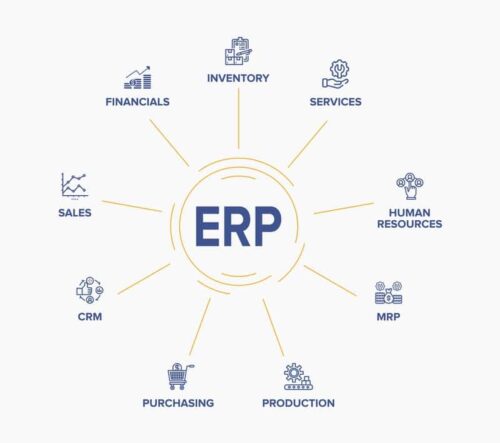
Back To Basics: What Is an ERP?
An ERP is business process management software that connects and integrates every aspect of a business — giving manufacturers visibility over their entire operation and allowing them to create better manufacturing processes, lower costs, and improve performance.

A manufacturing ERP that works as hard
as you do.
Give us a call to see how we’re different.

