Learn how shop floor data collection helps manufacturers improve scheduling, quality, equipment performance and cost control. Explore what to track and how an ERP connects production information with the rest of your business to support better decisions.
Shop floor data collection is an essential process for optimizing manufacturing operations.
Your shop floor is the heart of your manufacturing business. But how effectively are you using the data it generates? For many manufacturers, shop floor data collection remains an underused tool that can boost efficiency, improve decision-making, and cut costs.
Why Shop Floor Data Collection Matters
Managing complex BOMs, custom orders, and tight schedules requires real-time visibility into shop floor operations. Shop floor data collection provides visibility by gathering information from machines, workers, and workflows. With this data, manufacturers can streamline operations, improve oversight, and make smarter decisions. Shop floor data can also reduce waste and downtime, making it an essential tool for cutting costs and staying competitive.
How to Automate Shop Floor Data Collection
Shop floor data collection involves gathering important information from your shop floor, including production rate, machine speed, cycle times, labor use, defects and rework, and downtime.
Often, if data is collected at all, it is done manually. But manual data collection comes with problems. Human errors like omission, bias, or misreading numbers can lead to inaccurate data. Manual systems are also prone to siloed data that’s harder to share and increases the risk of further errors.
Automating shop floor data collection can help solve these issues. Sensors, ERPs, and other Industry 4.0 tech gather data and send it to be analyzed. The analyzed data is then displayed in dashboards, integrated with other tools, or used to trigger alerts and automated tasks. This real-time visibility leads to quicker decisions, better reporting, and smoother shop floor operations.
Why You Need a Connected Shop Floor
Your shop floor is central to your business, so why do so many manufacturers still rely on paper to manage it?
What Shop Floor Data Should Manufacturers Track?
The most useful data is the information that helps you answer a specific question about your shop. Start with the areas where you need better visibility, whether that is late jobs, higher-than-expected costs or recurring quality problems.
Job Progress and Work in Progress
Track which operations are complete, which are underway and which are waiting. For a custom order with several components, knowing that machining is finished does not necessarily mean the job is ready for assembly. You also need to know whether the other components and materials are available.
Actual Versus Estimated Labor Hours
Compare recorded time with the hours allowed for each operation. Include setup time where relevant. A difference between actual and estimated hours is a reason to investigate. The estimate may need updating, the work may have changed, or employees may have encountered a problem.
Machine Downtime and Delays
Record how long equipment is unavailable and why. Distinguish equipment breakdowns from other delays, such as waiting for material, instructions or an operator. These situations call for different responses, so recording only that a machine stopped may leave you without enough information to act.
Material Usage
Compare the material issued or consumed for a job with what was planned. Record scrap and replacement material as well. If a job uses more material than expected, that difference belongs in the review of its costs and the estimate for similar work.
Quality Results and Rework
Track inspection results, rejected parts and time spent correcting work. Include enough detail to connect a problem with the relevant job or operation. Rework can otherwise be difficult to distinguish from the time spent producing the part correctly the first time.
Use consistent definitions so people record the same activity in the same way. For example, agree on whether setup time is recorded separately and how to classify time spent waiting for materials. Consistency makes comparisons more useful.
How Shop Floor Data Collection Improves Manufacturing Operations
Collecting shop floor data is just the start. The real value comes from analyzing and using it. Tracking and analyzing data can help you monitor processes, improve efficiency, create accurate quotes, and keep costs under control.
For instance, tracking work orders and machine performance can highlight bottlenecks, while monitoring labor hours and materials helps you assess how resources are being used. Quality metrics like defect rates and inspection results help maintain high standards, and equipment data supports predictive maintenance to minimize downtime when combined with the appropriate monitoring and analysis tools.
Collecting and analyzing shop floor data can help you:
- Adjust production schedules to reduce delays
- Assign tasks and resources effectively based on real-time information
- Pinpoint quality issues and resolve them quickly
- Plan predictive maintenance to reduce the risk of unexpected breakdowns
- Make informed decisions about resource allocation and long-term strategy
Improve Scheduling and Estimating
For scheduling and estimating, comparing actual production times with planned times helps you see where estimates need adjusting. If an operation repeatedly takes longer than expected, you can investigate the cause and use what you learn to improve future quotes and schedules.
For example, suppose the estimated time for an assembly operation excludes a setup step that the team performs on every job. Reviewing the recorded work with the operators could reveal the omission. Updating the estimate would then account for that step, rather than allowing the same gap to affect the next quote and schedule.
For custom manufacturers, compare similar operations and account for differences in the work. A more complicated assembly may reasonably take longer. The goal is to understand the difference, not assume that every job should take the same amount of time.
Make Better Use of Work Centers and Equipment
Tracking work center activity also helps you understand where capacity is being used and where work is waiting. For example, a delay at one work center may hold up several jobs downstream. Seeing that delay sooner gives your team an opportunity to adjust priorities or reassign work where possible.
Consider a shop where finished components are waiting for inspection before they can move to assembly. The assembly team may have available time, but assigning more assembly work will not resolve the delay. Reviewing the queue and the inspection workload helps the team decide where to focus its attention.
Before changing a schedule, check whether the delay affects the jobs due next and whether another work center can perform the operation. Current information helps you assess those options without assuming every available machine or employee can do the same work.
Identify Quality Problems Earlier
Quality data adds another layer of visibility. Reviewing defects and inspection results by operation, machine or job can help reveal recurring problems. Your team can then investigate the cause and take corrective action, rather than treating each rejected part as an isolated issue.
For example, if several parts fail the same dimensional check, recording the results promptly gives the team a reason to review that operation before continuing. The investigation might include the drawing revision, setup and tooling. The inspection data identifies what needs attention; the team still needs to determine the cause.
Where supported, quality alerts can notify the responsible team when results fall outside defined limits. Agree on who will review the alert and what action they should take so the information leads to a response.
Plan Maintenance With Better Equipment Information
Records of breakdowns and repairs help you review recurring equipment problems and their effect on production. More detailed condition data, such as vibration or temperature readings, can support predictive maintenance when suitable sensors and analysis tools are in place.
That information can help maintenance teams assess when equipment needs attention. Connecting maintenance requirements with production plans also helps managers evaluate the jobs affected by a planned stoppage and prepare the necessary parts or resources. It does not eliminate breakdowns, but it can support more informed maintenance decisions.

Why an ERP is Key for Shop Floor Data Collection
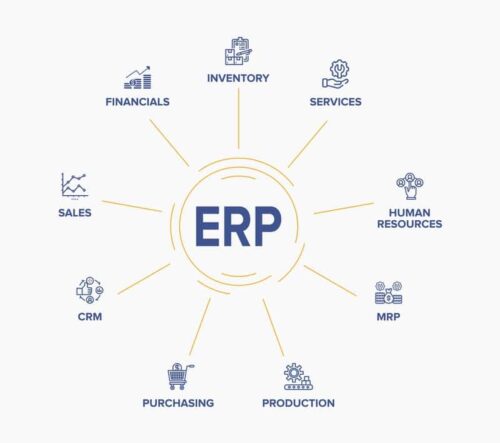
An ERP connects shop floor data with accounting, inventory, and sales, giving you real-time visibility across your entire operation. With everyone working from the same accurate, up-to-date data, you can make smarter, faster decisions.
ERPs help collect and analyze shop floor data. They track labor usage to help managers see how time is being spent, monitor production performance in real time, and help to quickly identify bottlenecks or inefficiencies. By tying shop floor activities to your broader business goals, an ERP makes your operation more efficient, connected, and competitive.
Connecting production data with financial information also helps you evaluate decisions about capacity and growth. Reviewing actual labor and material costs alongside production performance can help you understand which jobs are profitable and where costs are higher than expected. That information can inform decisions about equipment purchases, staffing or process improvements.
For example, a growing backlog may prompt a discussion about buying another machine. Before making that decision, review where the waiting time occurs, how much work the existing equipment completes and what causes its interruptions. The review may support the purchase, or it may reveal a process issue that needs attention first.
You can also use connected job information to investigate a cost overrun. If a job required extra labor and replacement material, reviewing those costs alongside its inspection and production records gives you a clearer starting point than reviewing the final total alone.
Genius ERP’s shop floor tools let teams track job progress, material usage and work-in-progress costs, and compare task completion with the plan. Having that information connected helps managers review what is happening in production and communicate priorities to the people doing the work.
Explore Genius Shop Floor
Key Takeaways
Shop floor data collection helps manufacturers improve scheduling, monitor quality, manage equipment and keep costs under control. Connecting that information with an ERP gives your team a clearer view of production and how it affects the rest of your business.
Learn more about how our Genius Shop Floor can help you capture and use shop floor data effectively.
Get your eBook Scared to implement a new ERP?
"*" indicates required fields