



If a customer calls about a broken motor on equipment you sold eighteen months ago, how long does it take your team to find the right spare part? For a lot of custom manufacturers, the honest answer is: it depends on who picks up the phone. That’s the exact problem Mohammed tackles in this session on after-sales in Genius ERP V18 — everything that happens once a product ships, from spare parts and warranties to service calls and field technicians. After-sales isn’t a footnote to the sale; it’s revenue in its own right, sometimes reaching a third of total revenue, often at a better margin than the original equipment. The session walks through how Genius ties every spare part, quote, sales order, and service call back to the equipment’s serial number, so the parts list narrows automatically once you pick the right unit — no guessing from a catalog. From there it covers warranty visibility right inside the quote or sales order, technician time and material tracking from a phone or tablet in the field, cost-plus and time-and-material invoicing, and drag-and-drop dashboards built in Genius Analytics that show open service calls, warranty costs, and after-sales revenue in real time. The throughline: turn a process that used to take up to forty minutes and several phone calls into something closer to four minutes and one screen.
What You’ll Learn in This Webinar
Chapter 1 — Why After-Sales Deserves Real Attention
Mohammed opens with a quick company overview — over 30 years in the industry, 140+ employees, tens of thousands of users, and 96% customer retention — before making the business case for treating after-sales as its own profit center. He cites three numbers: after-sales can reach up to a third of total revenue for manufacturers who take it seriously, the margin on spare parts often beats the margin on the original equipment, and roughly 1.3% of revenue gets spent running after-sales. A live poll asked attendees how long it takes to get an answer when a customer calls: 43% said “it depends on who picks up the phone,” 33% said five to thirty minutes, 19% said more than thirty minutes, and just 1% said under five minutes.
“You can think of your after sales as a machine on the floor.” — Mohammed
Chapter 2 — From Serial Number to Spare Part: the nGeniusWeb Demo
In a live demo of nGeniusWeb, Mohammed showed how picking a customer surfaces only the equipment (serial numbers) tied to that customer, and picking a serial number then filters the parts list down to just the spare parts linked to that specific unit — along with stock on hand and pricing, right inside the quote or sales order. Every document tied to that sales order rolls back up into a history against that one serial number. For manufacturers currently tracking this in a spreadsheet, he noted that equipment, customer, and spare-part history can be mass-imported into Genius rather than rebuilt from scratch.
“Starting from the customer’s equipment is knowing, but starting from the catalog is probably guessing.” — Mohammed
Chapter 3 — Making Warranty Coverage Visible at the Point of Sale
A second poll asked what share of after-sales work happens under warranty: 45% said less than 10%, 32% said ten to thirty percent, 5% said more than 30%, and the rest weren’t sure. Mohammed argued that not knowing is itself the problem, since warranty work costs money whether you charge for it or not. In Genius, clicking into a service line on a quote or sales order shows the warranty’s expiration date directly (he demoed a five-year warranty), and a workflow can automatically zero out the list price once a warranty is confirmed active. He also flagged the “end user” field, used when equipment is resold to a customer’s own customer — separate from who actually gets billed.
“The warranty belongs to the equipment.” — Mohammed
Chapter 4 — Field Service: Capturing Technician Time and Materials On-Site
For manufacturers with technicians on the road, Mohammed showed the web-based field-service screen technicians use from a phone, tablet, or computer to see assigned service calls, an upcoming-visit calendar, and the parts they can consume against a job. Assignments can be set up from a sales order and split across multiple technicians or multiple calls. Because the service call is created directly on the equipment record, every logged hour, consumed part, and expense rolls up into that equipment’s history — including whether the work was covered under warranty.
“The service call is created on the equipment, so it’s linked to it.” — Mohammed
Chapter 5 — Technician Reports and Flexible Invoicing
Before invoicing, technicians can generate a signed report the customer approves on-site, which attaches to the service call. From there, Mohammed showed two invoicing paths: a fixed price for the service, or a “cost-plus” time-and-materials invoice that breaks out labor, materials, and subcontracting costs on one side and the corresponding sales price for each on the other, depending on how the company configures it.
Chapter 6 — Real-Time Equipment Dashboards Built in Genius Analytics
Mohammed demoed a custom dashboard built in Genius Analytics — no SQL or programming required, just drag-and-drop — tracking KPIs like open service calls, after-sales revenue to date, and warranty claims and costs, updating live as new sales orders and service calls come in. Choosing a customer filters down to their equipment and warranty status, then to the spare parts linked to that serial number (with stock levels and expected delivery dates), then to the full sales and service call history for that unit.
“You don’t need to consult with other members or like other departments that you have.” — Mohammed
Chapter 7 — Reports for Service History, Costs, and Technician Work Orders
Mohammed walked through three standard reports built around the serial number: a service call history report showing what was done and when (with costs hidden — useful for technician-facing views), a cost-and-sales tracking report by serial number showing what warranty work actually costs the business, and a technician work order report showing assigned jobs and equipment history for whoever’s on the road. He also mentioned an optional “work holder” screen for pre-loading a job with the specific parts and task type a technician will need.
Chapter 8 — From 40 Minutes to 4: Turning After-Sales Into a Playbook
Mohammed closes by tying the session back to his opening example: what used to take up to forty minutes and multiple phone calls to engineering, inventory, or sales becomes a four-minute lookup once the process is set up — quote or sales order, linked equipment, full history, no guessing. He points attendees to QR codes for Genius Academy paths on setting up equipment and field service, and invites anyone interested to book a free call with customer success.
“That forty minutes becomes a four minutes because you have access to all the information.” — Mohammed
FAQ
What information does a service rep need when a customer calls about a spare part?
The key question is which serial number (or VIN) the customer is calling about. Once that’s known, the part number, stock, warranty status, and history can follow from the equipment record rather than requiring calls to engineering or inventory.
How much of a manufacturer's revenue can after-sales represent?
Mohammed cited after-sales reaching up to a third of total revenue for manufacturers who take it seriously, often at a better margin than the original equipment sale, while typically costing around 1.3% of revenue to run.
How does Genius know if a piece of equipment is still under warranty?
The warranty is attached to the equipment record itself. Clicking into the service line on a quote or sales order shows the warranty’s expiration date, and a workflow can automatically adjust pricing if the warranty is still active.
Can I get the warranty dashboard shown in the webinar for my own company?
During Q&A, Mohammed said attendees can reach out to customer success and reference the dashboard shown in the webinar, and the team will help build or implement something similar.
How much does Genius Analytics cost?
Mohammed didn’t have exact pricing on hand, but said the standard package includes three editors and compared it favorably to paying for a full Power BI subscription. He pointed attendees to customer success for current pricing and mentioned a one-month free trial is available to build and test reports before committing.

Get your eBook Scared to implement a new ERP?
"*" indicates required fields
Explore related articles

How will Artificial Intelligence Impact ERP Software?
AI technology built directly into ERP systems can help automate routine processes or create better user experiences by learning and adapting to user's language, allowing systems to better understand and respond to users.

What’s New in the HubSpot–Genius ERP Integration
See how our integration with HubSpot connects customer information, quotes and sales orders across both systems.
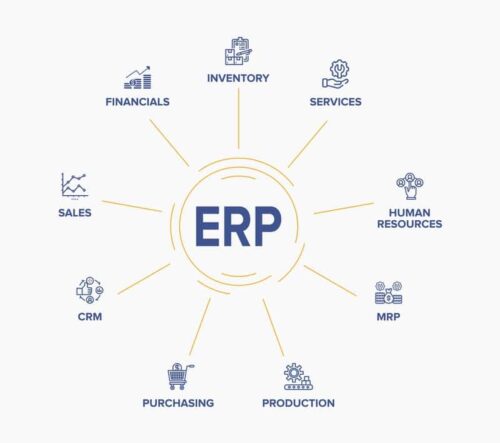
Back To Basics: What Is an ERP?
An ERP is business process management software that connects and integrates every aspect of a business — giving manufacturers visibility over their entire operation and allowing them to create better manufacturing processes, lower costs, and improve performance.

A manufacturing ERP that works as hard
as you do.
Give us a call to see how we’re different.

