Article

MTS vs ATO vs MTO vs CTO vs ETO: What’s the Difference?

Engineering, Inventory, Job Costing - All industries

Two manufacturers working on the shop floor using laptop

The way a product is built — when production starts, how much is standardized, and how much is customized — varies widely from one manufacturer to another.

Some businesses rely on forecasts and build products in advance to keep shelves stocked. Others wait until a customer places an order before starting production. In more complex environments, products may be configured from predefined options or engineered from the ground up for each job. Each of these approaches comes with different requirements for inventory, lead times, scheduling, and cost control.

These approaches are known as manufacturing strategies, and understanding them is essential for making better decisions about how your operations are structured. 

Terms like Make to Stock (MTS), Assemble to Order (ATO), Make to Order (MTO), Configure to Order (CTO), and Engineer to Order (ETO) are often used in manufacturing discussions, and each represents  a different way of operating and responding to demand — with its own trade-offs.

In this article

We break down the five most common manufacturing strategies — MTS, ATO, MTO, CTO, and ETO — and explain how they differ in practical terms.

You’ll see how each approach affects production planning, inventory management, and lead times, where each one typically fits, and how key strategies compare—including the differences between MTO and ETO. We also outline how to determine which approach makes sense for your business, and how ERP systems support these strategies as operations become more complex.

What are manufacturing strategies?

A manufacturing strategy defines when and how production is triggered relative to customer demand.

At one end of the spectrum, production is driven by forecasts. Products are built in advance, based on expected demand, and stored as inventory. At the other end, production only begins once a customer order is received, and in some cases, after engineering work is complete.

Most manufacturers fall somewhere between these two extremes.

The more you move toward customization, the more complexity you introduce. Engineering becomes more involved. Scheduling becomes less predictable, and costs become harder to estimate and track. At the same time, flexibility increases, and the ability to meet specific customer requirements improves.

Understanding where your business sits on this spectrum is the first step in choosing the right processes — and the right systems — to support it.

How ERPs Drive Success for Every Type of Manufacturer

Make to Stock (MTS)

Make to Stock is the most standardized approach to manufacturing.

Products are produced in advance, based on demand forecasts, and stored as finished goods. When a customer places an order, it is fulfilled directly from inventory.

How it works in practice

Production planning is driven by historical demand and forecasting. Manufacturers aim to maintain enough stock to meet expected orders without overproducing.

Inventory is held in the form of finished goods, and the goal is to keep service levels high while minimizing excess.

Who uses it

MTS is typically used in environments where:

  • Products are standardized
  • Demand is stable and predictable
  • Lead time expectations are short

Advantages and trade-offs

The main advantage of MTS is speed. Orders can be fulfilled immediately, without waiting for production.

The trade-off is inventory risk. If forecasts are inaccurate, manufacturers may end up with excess stock, obsolete products, or tied-up capital.

MTS works best when demand patterns are well understood and relatively consistent.

Assemble to Order (ATO)

Assemble to Order introduces a level of customization while still relying on standardized components.

Instead of producing finished goods in advance, manufacturers produce or stock components and subassemblies. Final assembly is completed only after a customer order is received.

How it works in practice

Inventory is held at the component level rather than as finished goods. When an order comes in, the required components are assembled into the final product.

Customers may choose from a set of predefined options, but the structure of the product remains consistent.

Who uses it

ATO is commonly used when:

  • Products share common components
  • Customers expect some level of choice or variation
  • Lead times need to remain relatively short

Advantages and trade-offs

ATO reduces the risk of holding finished goods inventory while still enabling faster delivery than fully custom production.

However, it requires accurate planning at the component level. Shortages of key parts can delay assembly and impact delivery times.

Make to Order (MTO)

Make to Order shifts production entirely to a demand-driven model.

Products are not built until a customer order is received. There is little to no finished goods inventory, and each job is planned and executed individually.

How it works in practice

Once an order is confirmed, materials are allocated or purchased, and production is scheduled.

The product itself is usually predefined, but it is built specifically for that order rather than from stock.

Who uses it

MTO is typically used in environments where:

  • Demand is unpredictable
  • Product volumes are lower
  • Inventory risk needs to be minimized

Advantages and trade-offs

MTO reduces inventory carrying costs and eliminates the risk of unsold finished goods.

At the same time, it increases reliance on accurate scheduling, purchasing, and coordination. Lead times are longer, and delays in one area can quickly impact delivery.

MTO requires strong visibility across the entire production process.

Configure to Order (CTO)

Configure to Order builds on the flexibility of ATO, but with more structure around how products are defined.

Customers select from a set of predefined options, and those selections determine the final product configuration.

How it works in practice

A configuration system — often tied to the ERP or quoting process — ensures that only valid combinations are selected.

The system can automatically generate bills of materials and production requirements based on the chosen configuration.

Who uses it

CTO is commonly used when:

  • Products have many possible variations
  • Customization is needed, but within defined limits
  • Standardization is still important for efficiency

Advantages and trade-offs

CTO allows manufacturers to offer flexibility without the full complexity of engineering every product from scratch.

However, it requires well-defined product structures and rules. Without that foundation, configuration can become inconsistent or error-prone.

CTO also depends heavily on alignment between sales, engineering, and production.

Engineer to Order (ETO)

Engineer to Order is the most complex manufacturing strategy.

Each project begins with engineering work, and the final product may not be fully defined at the time of quoting.

How it works in practice

Engineering teams develop designs, create bills of materials, and define production steps for each job.

Changes are common throughout the process, and production often overlaps with ongoing design work.

Who uses it

ETO is typically used in industries such as:

  • Industrial machinery and equipment
  • Aerospace and defense
  • Custom fabrication and large assemblies

Advantages and trade-offs

ETO provides maximum flexibility and allows manufacturers to meet highly specific customer requirements.

It also introduces significant complexity:

  • Quotes are harder to produce accurately
  • Engineering changes can affect production schedules
  • Costs evolve over the life of the project
  • Coordination across departments is critical

In ETO environments, visibility and control are essential. Without them, projects can quickly go off track.

How ERP Systems Help Engineer-to-Order (ETO) Manufacturers

Key differences between MTS, ATO, MTO, CTO, and ETO

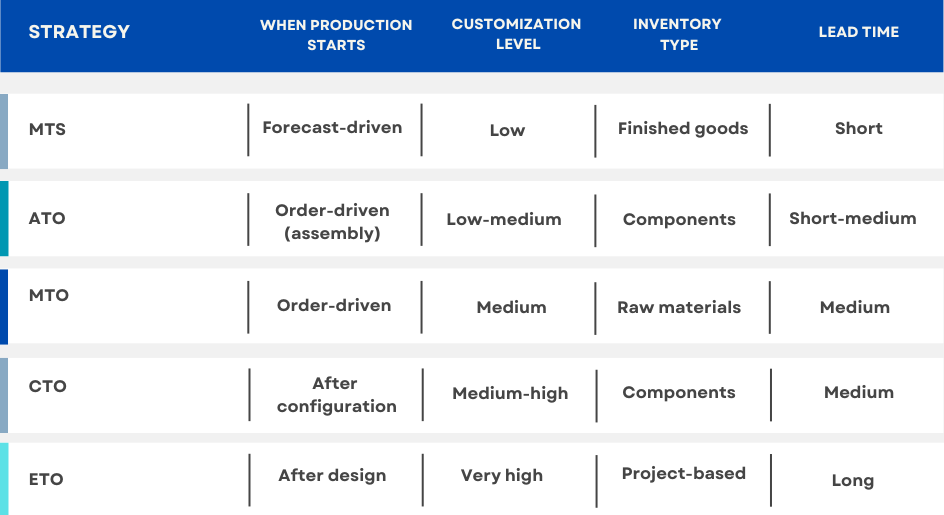
The easiest way to understand these strategies is to compare them side by side.


Key differences between MTS, ATO, MTO, CTO, and ETO

As you move from MTS to ETO:

  • Customization increases
  • Lead times increase
  • Planning becomes more complex
  • The need for coordination across teams grows
  • The need for strong systems increases

There is no single “best” strategy. Each one reflects a different balance between efficiency and flexibility.

MTO vs ETO: Where customization changes everything

MTO and ETO are often grouped together, but they are fundamentally different.

In MTO:

  • The product is already defined
  • You’re building it per order
  • Engineering is minimal or fixed

Planning focuses on scheduling, material availability, and execution.

In ETO:

  • The product is not fully defined upfront
  • Engineering is part of the process
  • Costs, timelines, and scope can evolve

This difference has a major impact on operations. In ETO environments:

  • Quotes are harder to produce accurately
  • Engineering changes affect production
  • Costs need to be tracked in real time
  • Projects need to be managed across departments

The shift from MTO to ETO is not just about more customization. It changes how the entire business operates. That’s why ETO manufacturers rely heavily on systems that connect engineering, production, and financials.

How to choose the right manufacturing strategy

There’s no single “best” strategy. It depends on what you build and how your customers buy.

Here are a few practical questions to guide the decision:

How predictable is your demand?

→ Stable demand favors MTS or ATO

How much customization do customers expect?

→ Higher customization pushes toward MTO, CTO, or ETO

How complex are your products?

→ Complex assemblies often require CTO or ETO

How important are lead times?

→ Faster delivery favors MTS or ATO

How much risk can you carry in inventory?

→ Lower tolerance favors MTO or ETO

Many manufacturers don’t fit neatly into one category. It’s common to use a mix — for example, standard components (MTS) combined with custom assemblies (MTO or ETO).

As businesses grow, product lines expand, or customer expectations change, it’s common to see a shift from one strategy to another.

For example, a company may start with a Make to Stock approach when demand is stable and products are standardized. As customers begin to request more variation, that same business might move toward Assemble to Order or Configure to Order to offer more flexibility without significantly increasing lead times. In more complex environments, especially where products become larger or more customized, Make to Order or Engineer to Order often becomes necessary.

Many manufacturers also operate hybrid models. Standard components may be produced and stocked using an MTS approach, while final assemblies are built to order using MTO or CTO. In project-based environments, it’s not uncommon to see ETO processes layered on top of more standardized subassemblies.

This mix allows manufacturers to balance efficiency and flexibility. The challenge is managing that complexity—especially when different strategies coexist across products, departments, or stages of production. Without clear processes and strong system support, it becomes difficult to maintain visibility, coordinate work, and control costs across the business.

How ERP supports each manufacturing strategy

As manufacturing strategies become more complex, manual processes and disconnected systems become harder to manage. Information gets spread across spreadsheets, emails, and separate tools, making it difficult to maintain a clear picture of what’s happening across the business.

An ERP system provides a centralized platform to coordinate planning, production, inventory, and financials. The role it

In MTS environments

ERP supports forecasting, inventory management, and replenishment planning. It helps ensure that stock levels are aligned with expected demand and that production runs are scheduled efficiently.

For example, planners can use historical data to adjust reorder points and safety stock levels, reducing the risk of both stockouts and excess inventory.

In ATO and CTO environments

ERP connects configuration, inventory, and production, ensuring that the right components are available and that orders are built correctly.

When a customer selects a configuration, the system can automatically generate the required bill of materials and check component availability. This reduces errors, avoids manual rework, and helps keep lead times consistent even as product variation increases.

In MTO environments

ERP helps manage job-based scheduling, purchasing, and cost tracking, providing visibility into each order as it moves through production.

It allows teams to track material requirements, allocate resources, and monitor progress in real time. This is especially important when multiple jobs are competing for the same capacity, and delays in one area can impact others.

In ETO environments

ERP plays a critical role in linking engineering, BOM creation, project management, and financial tracking.

As designs evolve, the system helps ensure that changes are reflected across production, purchasing, and costing. Teams can track project budgets, monitor actual vs estimated costs, and maintain visibility across long, complex projects where multiple departments are involved.

As complexity increases, the value of having a connected system becomes more apparent. Without it, maintaining visibility and control across operations becomes difficult, especially when engineering, production, and financial data are not aligned.


Final thoughts

MTS, ATO, MTO, CTO, and ETO represent different ways of structuring manufacturing operations. Each one comes with its own advantages, trade-offs, and operational requirements.

Understanding these strategies helps clarify how your business responds to demand, manages resources, and delivers to customers.

For manufacturers dealing with increasing complexity — whether through customization, product variation, or project-based work — choosing the right approach is only part of the solution. The processes and systems that support that approach matter just as much.

See how ERP supports your manufacturing strategy

Whether you’re running MTS, MTO, ETO, or a mix of approaches, the right system helps you manage complexity, maintain visibility, and stay in control as your operations grow.

Take a virtual tour of Genius ERP to see how manufacturers manage planning, inventory, and production across different strategies.

Get your eBook Scared to implement a new ERP?

"*" indicates required fields

This field is for validation purposes and should be left unchanged.
close-btn

Let’s talk about your shop