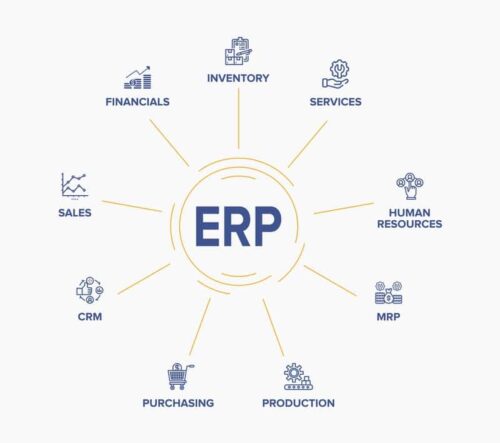
We’ll look at how an ERP can connect engineering with the rest of the shop, reduce manual work between CAD and production, and help ETO manufacturers manage changing designs. We’ll also cover what engineers should look for when choosing a system.
Why Do Engineers Need an ERP?
Engineers need an ERP system that has their unique needs in mind, including creating and managing Bills of Materials (BOMs), routing steps, and work instructions. Engineers also need an ERP that allows for the seamless integration of a CAD system with the ERP.
The engineering department, especially within ETO (engineer-to-order) and custom manufacturing environments, is one of the most critical departments in a manufacturing shop. Highly customized work means a lot of engineering time is needed on every order that passes through these types of shops.
In a typical shop, transferring BOMs out of a CAD system and into an ERP may take up to 20% of total engineering time. This means that engineers are tasked with hunting down and reentering information into multiple systems. This not only wastes valuable time and increases the chance for human error, but it also decreases the productivity and efficiency of the engineering department because instead of focusing on more productive tasks, engineers are doing data entry.
ERP Benefits for Engineers
ERP systems can help engineers move projects forward, save time, and share information with the rest of the shop.
But many ERPs, even those designed for manufacturing, leave engineering out of the loop. They connect accounting, purchasing, scheduling, and inventory, while the people designing the product still work in separate CAD systems, spreadsheets, and documents. That makes it harder to get engineering information to the teams that need it.
When engineering is connected to the ERP, teams can share information throughout the job:
Sales:
- Use engineering details to build more accurate estimates
- Confirm which product options are compatible
Production/Purchasing:
- Access BOMs, routing steps, drawings, and work instructions
- See design progress and plan around approved releases
- Track changes and work from the correct revision
Accounting:
- Track and allocate R&D and project-specific engineering time
Customers:
- Review drawings and estimates for approval
- Receive updates on project progress
Discover Genius ERP CAD2BOM Engineering
CAD Integration
One of the most cumbersome and detailed tasks in the engineering department is creating the BOM. In many manufacturing ERPs, someone must take a CAD model, list the parts it contains, and build a BOM that purchasing and production can use. They may also need to add routing steps and work instructions, then reenter that information in the ERP.
Inefficient, to say the least.
The best manufacturing ERP systems connect CAD software to the ERP, so engineers don’t have to rebuild the same information by hand. A CAD integration can extract parts and assemblies from a design and create a BOM in the ERP. Engineers can then review it, add the details needed for manufacturing, and make it available to the rest of the shop.
That saves engineers time they would otherwise spend manually creating and entering BOMs. It also reduces the chance of errors from reentering information in multiple systems. And because the BOM is connected to inventory and purchasing, the team can see what components are already available and what needs to be ordered for the job.
This connection is especially useful while a design is still in progress. Engineers may know that a job requires a long-lead component before every drawing and assembly is complete. If that information is available to purchasing early, the team can order the component while engineering continues its work, rather than discovering the lead time when the full design is released.
The BOM still needs to be checked as the design develops. If a part changes, engineers need to update the BOM and make sure purchasing and production are working from the right version. Connecting CAD and ERP makes that information easier to manage and share throughout the job.
What Do ETO Manufacturers Need From an ERP?
ETO (engineer-to-order) manufacturers are unique in that they are always designing, engineering, creating, and building custom products, meaning they never really build the same thing twice.
An ERP for this kind of work needs to support change throughout the job, from the first estimate to the final build. Engineers may begin with a concept, refine the design after a customer review, and make further changes when they learn more about materials or manufacturing constraints. Sales, purchasing, and production need to know what is firm enough to act on at each stage.
On a custom job, engineering may finish some parts of the design before others. If the team already knows which components will take a long time to arrive, purchasing can order them while engineers complete the remaining drawings and models. Production can start on portions of the job that are ready, without waiting for the entire design to be finished.
For that to work, purchasing and production need to see what engineering has finished and what may still change. An ERP can keep the BOM, drawings, and job information together, so engineers can release completed work and update the other teams when the design changes.
Challenge: Increased Customization
In the past, your draftsmen provided your shop with drawings based on specs from your customers. Now, you may also be working from designs that customers have created themselves.
This means manufacturers need to think more carefully about how customer designs will be assembled and built efficiently, including how to apply Design for Manufacturing (DFM) principles.
What this translates to is that today you probably have more people working in the engineering room than ever before—and that you have to go beyond the basic design processes you used in the past.
After identifying what will be purchased or manufactured, you must now define the routing steps. To make this process easier, many manufacturers manage routing steps and instructions straight from their 3D CAD software to speed up the process once the design is complete and decrease the potential for mistakes on the production floor. Having an ERP that connects to your CAD system will help manage this process and allow you to automate routing steps.
Managing Engineering Changes Across the Shop
A revision does not end when an engineer updates a drawing. If a job is already underway, that change may affect parts on order, materials in stock, work instructions, scheduled operations, and the original estimate. The engineering team needs a way to see where the job stands before releasing the new design.
When a customer requests a change after work has started, engineering needs to update the design and BOM and identify what else is affected. Purchasing may need to review orders already placed and materials already received. Production needs to know whether work completed or underway can continue as planned. Sales may also need to discuss changes to the price or delivery date with the customer. Each team needs to understand the change before it acts on the new design.
An ERP can help keep those decisions connected to the job. Engineers can record the revision and make the updated BOM and drawings available to the teams that use them. Purchasing can review the material changes, while production can check which instructions apply to work that has not yet been completed. The team can also compare the revised requirements with the original estimate to understand the cost of the change.
That does not mean every design update should automatically change an active job. The team still needs to decide whether the revision applies to work in progress, future orders, or both. Clear approval and release steps help prevent a new drawing from reaching the shop floor before purchasing and production are ready to use it.

What Should Engineers Look for in an ERP?
The right system depends on how your shop designs products and releases work. Before choosing an ERP, walk through a real job with the people who create the designs and the people who use them. Follow it from quote to drawing, BOM, purchasing, routing, production, and revision. Where do people enter the same information twice? Where do they have to ask which document is current?
Pay particular attention to these questions:
- CAD and BOMs: Can engineers transfer the assemblies and parts they need, review the results, and manage complex BOMs without rebuilding them by hand?
- Revisions: How are changes recorded, approved, and communicated to purchasing and the shop floor? Can the team see what version is being used on a particular job?
- Routing and instructions: Can engineers attach the steps, documents, and details production needs to build the product?
- Flexible releases: Can purchasing or production receive approved information for part of a job while engineering continues work on the rest?
- Project visibility: Can the team track engineering time and see how design decisions affect job costs and schedules?
The answers need to match the way your shop actually works. A system that handles a simple, standard product well may need a closer look when you give it a heavily customized assembly with several revisions and long-lead parts.
ERP Module for Engineers
Genius ERP’s Engineering module accelerates job progress with more integrated engineering and CAD2BOM.
With Genius Product Engineering you can:
- Engineer from scratch, or use historical data to design custom products and anticipate resource requirements with greater accuracy
- Generate drawings/models, attach documents in the ERP
- Break down your engineering design into multiple/concurrent releases to make on-time delivery
- Manage revisions
Genius ERP’s CAD2BOM feature makes it simple to directly transfer your BOM from your CAD program into Genius ERP with a click of a button, creating a fully itemized, complex BOM. Not only does this save you time, but it also ensures that you eliminate human error that can occur from having to re-enter data.
Genius ERP also makes it easy to manage complex BOMs, letting you edit and manage your imported BOM with ease, adding the required layers of detail that you need. And because your BOM is housed within your ERP, you can ensure everyone in your shop works off the latest and most accurate version.
Want to see how Genius ERP can help custom manufacturers save on engineering time and increase productivity? Check out our case studies.
Get your eBook Scared to implement a new ERP?
"*" indicates required fields