Article

Why ERP Engineering Integrations Matter — and How They Improve Manufacturing

Engineering, ERP - All industries

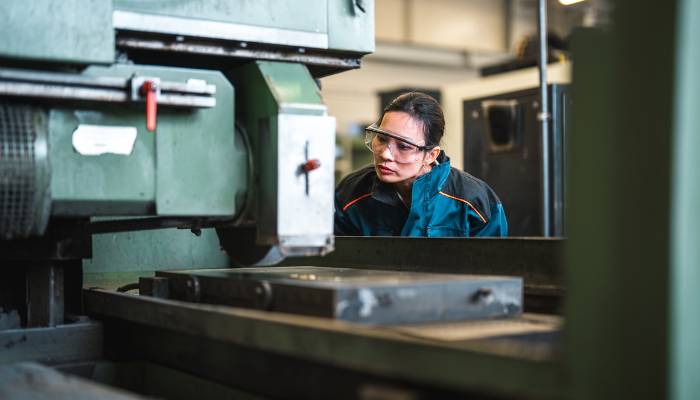
Engineering employer examine production plan machine

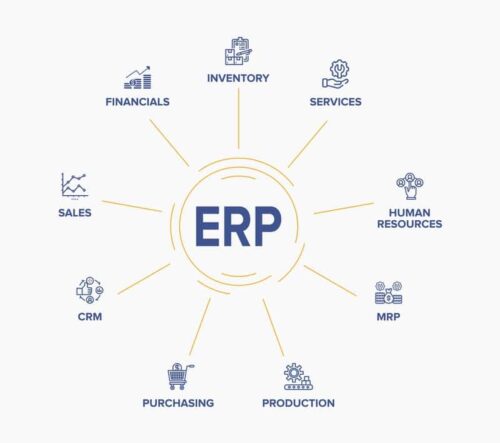
At its core, ERP integration means connecting your ERP system with the other applications your business relies on—finance software, supply chain tools, engineering design platforms, and more—so that information can flow easily across your organization. By breaking down silos and centralizing data, ERP integrations help your teams collaborate better, work faster, and make smarter decisions based on real-time information.

Manufacturing businesses used to rely on only a few core applications. But today, hundreds of specialized tools exist for everything from quoting to engineering to financial forecasting. Without integration, employees waste time searching for information, manually entering data, or relying on outdated spreadsheets. This slows down operations and increases the risk of errors, miscommunication and inconsistent data across departments.

That is why integrating your ERP with engineering and business tools is so important. A manufacturing ERP—like Genius ERP—acts as the backbone of your operations, connecting a wide range of business applications into one streamlined, efficient system.

In this article

Learn how ERP engineering integrations connect CAD and other design tools with the rest of your manufacturing operation. See how they reduce manual entry, improve BOM and revision accuracy, support concurrent engineering and keep engineering, purchasing and production aligned.

What is ERP Engineering Integration?

ERP engineering integration means connecting engineering design tools, such as CAD software, with your ERP system. This allows product data to move from engineering into the system used by purchasing, production, planning and other departments without being manually recreated.

That data can include:

  • Bills of materials (BOMs)
  • Part numbers and descriptions
  • Part and assembly structures
  • Revisions and versions
  • Material specifications
  • Engineering attributes used for costing and production
  • Routing information

Without an integration, engineers may complete a design in CAD only for someone to rebuild the same information in the ERP. Part numbers must be entered, BOMs recreated and revisions checked before production can begin. Every manual handoff takes time and creates another opportunity for information to be missed or entered incorrectly.

An engineering integration automates this flow while keeping the original product structure intact. Other teams can then use the information to plan, purchase and build the job.

Why Engineering Integrations Matter

ERP engineering integrations help manufacturers save time, improve collaboration and speed up product development. By connecting engineering tools with your ERP, you can automate BOM creation, reduce design errors and get products into production faster.

Related Article

Get Seamless CAD Integration with Genius CAD2BOM

With a BOM in hand, you can start the purchasing process and acquire any raw materials or parts needed, letting you start production faster.

Learn more
cad2bom engineer

Connecting engineering applications such as CAD software to your ERP lets you:

  • Improve collaboration between engineering, production, and other teams
  • Streamline the flow of information, reducing errors and eliminating duplicate data entry
  • Accelerate product development and get designs into production faster
  • Manage BOMs (Bill of Materials) with greater accuracy and speed
  • Easily track design changes and maintain version control across teams

ERP engineering integrations bridge the gap between design and production, helping manufacturers move faster, reduce errors, and stay competitive.

But not every integration works the same way. Some integrations simply attach or link CAD files to an ERP record. That may make the files easier to find, but it does not solve the larger problem of getting usable engineering data into the ERP.

A practical CAD-to-ERP integration needs to move structured data, not just files. It should create BOMs from CAD, preserve part and assembly structures, map important attributes and help manage revisions as designs evolve. If engineering teams still need to rebuild or correct the information after it reaches the ERP, much of the value of the integration is lost.

The connection also needs to support the way manufacturers work. In custom and engineer-to-order environments, engineering, purchasing and production often overlap. Teams need accurate information as it becomes available, even when the design is not yet complete.

Benefits of ERP Engineering Integrations

Reduce manual work and errors

Manual data entry slows engineering teams down. Engineers should not have to spend their time rebuilding BOMs, re-entering part attributes or cross-checking information between CAD and ERP systems.

An integration transfers product data directly into the ERP in a structured format. This reduces administrative work and helps prevent problems such as incorrect quantities, missing components, mismatched revisions and inconsistent part names. Engineers have more time for engineering work, while the BOM used for costing, purchasing and production more closely reflects the original design.

Give other departments earlier access to engineering data

The benefits of engineering integration extend beyond engineering. Design decisions affect material requirements, costs, lead times, schedules and what happens on the shop floor. When engineering data remains in a separate system, other teams may be left waiting for information or working from static files that are already out of date.

When your engineering tools and ERP are connected:

  • Production can access structured BOMs connected to the correct drawings
  • Purchasing can see material requirements and long-lead items earlier
  • Planners can understand how a design affects capacity and schedules
  • Project managers can see how engineering changes affect timelines
  • Finance can connect costs to the actual product structure

Sharing this information earlier helps teams prepare while engineering work is still underway. It also reduces the back-and-forth that can turn engineering into a bottleneck.

Manage design changes more effectively

Design changes happen, especially in custom and engineer-to-order manufacturing. What matters is how well those changes move through the rest of the business.

Without integration, even a small design change can create uncertainty about which revision is correct. Purchasing may order the wrong component, or production may begin work using an outdated BOM or drawing. These mistakes can lead to delays, scrap and rework.

An ERP engineering integration makes revised BOMs, components and versions visible to downstream teams sooner. It does not eliminate the need to manage changes, but it gives manufacturers a more controlled and traceable way to keep engineering and production aligned.

Support concurrent engineering and better production planning

Concurrent engineering allows teams to work on different phases of a project at the same time instead of waiting for engineering to finish before other work begins. While designs are still being finalized, purchasing and planning can review material requirements, identify long-lead items and flag potential issues.

Engineering data also forms the basis of the production plan. BOMs tell purchasing and production which parts and materials are required, while routing information identifies the operations and resources needed to build the product. When this information flows into the ERP, it can support material planning, capacity planning, scheduling and shop-floor execution.

Connecting CAD data directly to the ERP gives teams shared access to current product information. Engineering, purchasing and production can move forward together rather than waiting for a final handoff. Potential constraints can be identified earlier, when changes are easier and less disruptive.


Two engineering integrations that power up your operations

Genius ERP offers out-of-the-box connections with leading engineering tools. Here is a closer look at two of our most popular engineering integrations.

SOLIDWORKS Integration

Our SOLIDWORKS integration directly connects your CAD design software with Genius ERP, so your engineering and production teams always work from the same real-time data.

With one click, you can turn your SOLIDWORKS designs into a fully itemized Bill of Materials (BOM) inside Genius ERP—eliminating manual data entry, reducing errors, and keeping your shop floor aligned with the latest designs. The integration also supports shared part libraries and routing templates, making it easier to standardize and streamline your engineering workflows.

By integrating SOLIDWORKS with Genius ERP, you’ll simplify handoffs between teams, reduce delays, and bring new products to life faster, with less back-and-forth and fewer costly mistakes.

Autodesk Inventor Integration

Our Autodesk Inventor integration combines advanced 3D modeling capabilities with Genius ERP’s full suite of manufacturing tools.

With our CAD2BOM integration, product data from Autodesk Inventor flows directly into Genius ERP. This ensures design accuracy, reduces duplication of effort, and shortens the design-to-production timeline. You can optimize resource planning, synchronize engineering and manufacturing activities, and keep your projects moving without bottlenecks or data errors.

Like our SOLIDWORKS integration, connecting Autodesk Inventor with Genius ERP creates a unified environment that helps your teams work smarter—not harder.

schema blue background texture
Genius ERP Feature

Genius CAD2BOM

Engineering integration in action

Machitech needed to synchronize product and business information across seven facilities. With Genius ERP connecting its CAD designs and production data, the company improved the flow of item numbers, BOMs and other information between locations. This helped Machitech support its growth while maintaining more consistent processes across the business.

At Marathon Equipment, shop-floor employees previously relied on weld binders and printouts for production information. CAD2BOM allowed engineering information to move into Genius ERP so updated models and job details were available on the floor. This gave production better access to current information and reduced delays caused by manual handoffs and missing parts.

These examples show that engineering integration is about more than saving time on data entry. It improves how information moves across the entire operation.

Final Thoughts

ERP engineering integrations help manufacturers build a more connected, efficient operation. When engineering data flows directly into the ERP, teams can create BOMs faster, reduce manual entry, manage design changes and give purchasing and production earlier access to the information they need.

With Genius ERP, you can connect leading engineering tools to the system that runs the rest of your manufacturing business. Whether you are creating BOMs directly from CAD models or coordinating complex design changes across departments, engineering integrations help you move work from design to production with fewer delays and errors.

Get your eBook Scared to implement a new ERP?

"*" indicates required fields

This field is for validation purposes and should be left unchanged.
close-btn

Let’s talk about your shop